
Stat channels
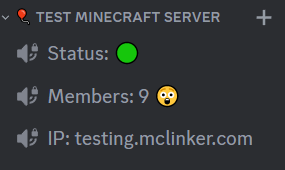
Stat channels show live server info in your channel list: how many players are online, your server address, version or the time. They update by themselves when players join or leave, or when the server starts or stops.
Before you start
- Your server is connected.
- MC Linker has Manage Channels on the channel you want to use.
- Create the channel first. Voice channels work well: nobody can write in them and the name is always visible.
Set it up
- Create a channel, for example a voice channel in a category called Server stats.
- Run
/statchannel add, pick that channel and write a template for when the server is online:
/statchannel add channel: 🔊Online online: 🟢 %count% players online offline: 🔴 Server offline
- The channel renames itself right away:
Placeholders
| Placeholder | Becomes |
|---|---|
%count% | Number of players online (0 when the server is offline) |
%ip% | Your server address (the display-ip you set with /connect, or the server's IP) |
%version% | The Minecraft version, like 26.2 |
%time% | The time of the last update, like 18.10.26 18:30 |
Options
| Option | Required | What it does |
|---|---|---|
channel | Yes | The channel to update. |
online | Yes | The text while the server is online. |
offline | No | The text while the server is offline. If you leave it out, the online text is used (with %count% as 0). |
update_target | No | Name (default) updates the channel name. Topic updates the channel topic instead (text, announcement and forum channels only). |
Ideas
| Online template | Shows |
|---|---|
🟢 %count% online | 🟢 7 online |
📍 %ip% | 📍 testing.mclinker.com |
Minecraft %version% | Minecraft 26.2 |
Players: %count% · updated %time% | Players: 7 · updated 18.10.26 18:30 |
You can add several stat channels, for example one for the player count and one for the address.
Manage it
| Command | What it does |
|---|---|
/statchannel list | Shows your stat channels with their templates. |
/statchannel remove channel: … | Stops updating a channel. The channel itself stays. |
To change a template, run /statchannel add for the same channel again.
Updates can lag a little
Discord only lets bots rename a channel twice every 10 minutes. On a busy server, the name may lag behind a little; MC Linker catches up as soon as Discord allows it. Topic updates have the same limit.
Troubleshooting
| What you see | What to do |
|---|---|
| Cannot Edit Channel | Give MC Linker Manage Channels on that channel (or its category). |
| No Topic Supported | That channel type has no topic. Use update_target: Name, or pick a text channel. |
| The name doesn't change | Wait up to 10 minutes (see above). If it never changes, check that the server is connected. |